Compare
A Covenant Eyes alternative that filters without screenshots
Covenant Eyes is built around accountability: it screenshots what is on screen and sends blurred images to a partner who reviews them. FamilyProtect blocks harmful sites before they load and reports what was blocked, without screenshotting anyone.
Choose FamilyProtect if
You want to block harmful content on the family PC without screenshots or a reviewer.
Choose Covenant Eyes if
You want an accountability partner reviewing on-screen activity.
See what you actually get
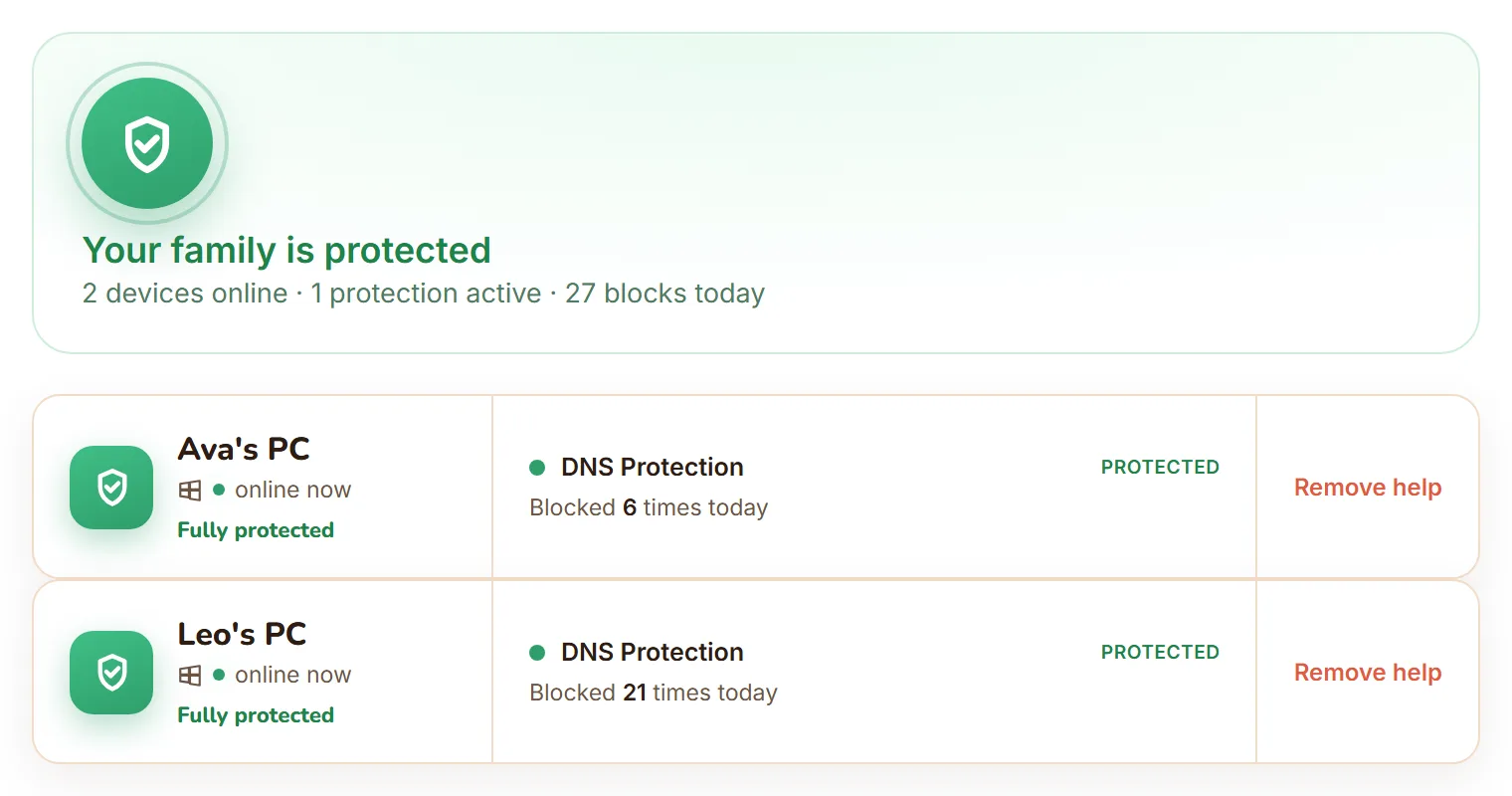
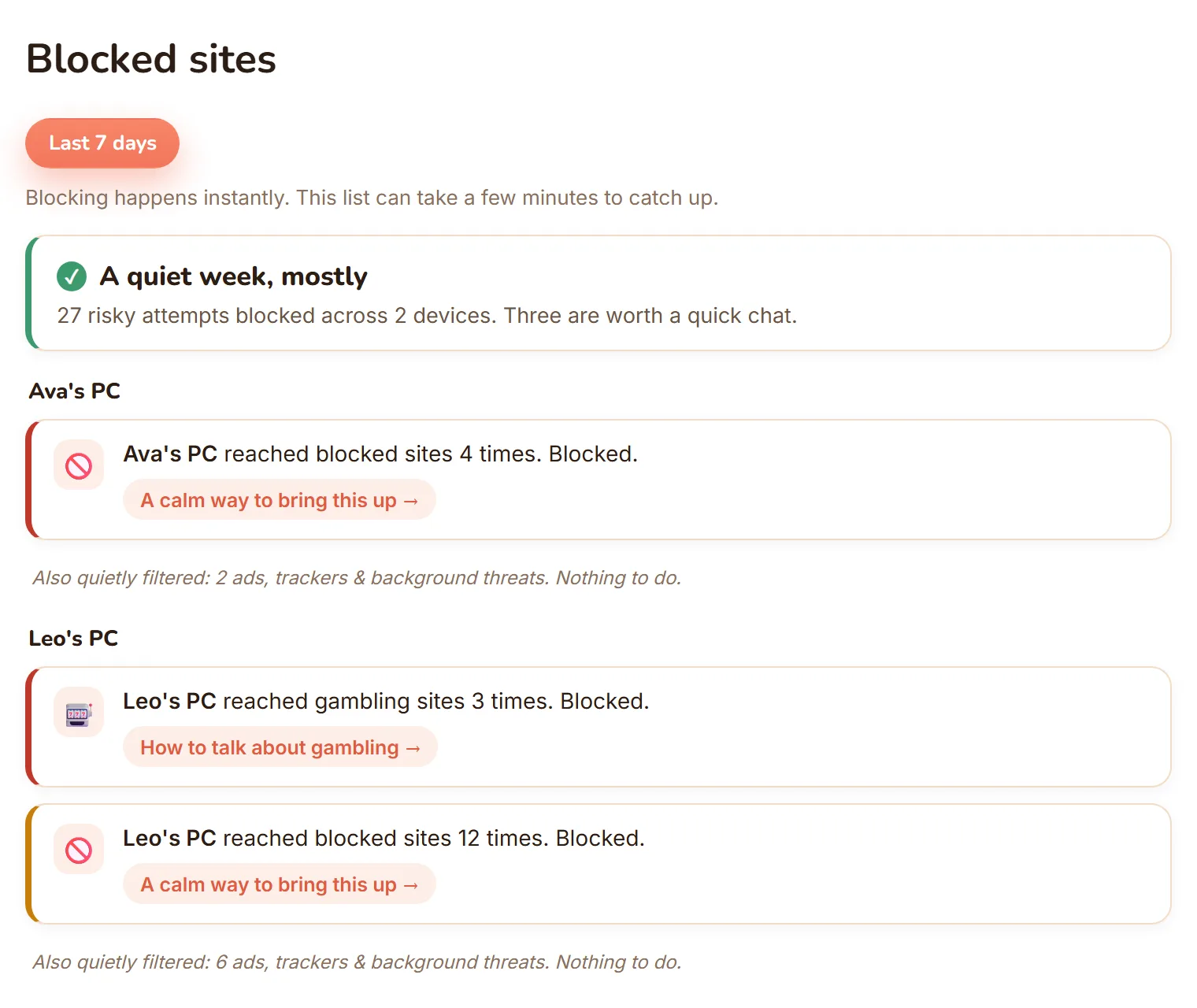
The real dashboard, not a mockup: every Windows PC in one view, and blocked sites shown as calm, per-child moments.
| Feature | FamilyProtect | Covenant Eyes |
|---|---|---|
| Approach | Block harmful sites, report blocks | Screenshot activity for an accountability partner |
| Screenshots of activity | No, by design | Yes, core feature |
| Content filtering | Network-level, every browser and app | Filtering plus monitoring |
| Bypass resistance | Blocks known encrypted-DNS (DoH) endpoints and VPN or anonymiser domains, self-heals | App-level |
| What parents receive | Blocked-sites feed, three tiers | Reports of screenshots for a partner |
| Price | $5.99 a month, all family PCs | $18 a month, or $198 a year, for the whole family |
Does FamilyProtect screenshot activity like Covenant Eyes?
No. Covenant Eyes takes periodic screenshots of what is on screen, blurs them, and sends them to an accountability partner who reviews them. FamilyProtect never screenshots. It filters web content at the DNS layer so harmful sites do not load, and shows you what was blocked. One model relies on a person reviewing images of activity; the other blocks the content and reports it. Choose the approach you are comfortable with for your family.
Which one blocks harmful sites more reliably?
FamilyProtect filters at the DNS layer for the whole PC, so every browser and app is covered and a second browser does not get around it. It blocks the common escape routes, known encrypted-DNS (DoH) endpoints and VPN or anonymiser domains, and repairs itself within minutes if tampered with. Covenant Eyes filters too, but its defining feature is accountability screenshots rather than tamper-resistant network blocking.
Covenant Eyes vs FamilyProtect: what does each cost?
Covenant Eyes is $18 a month, or $198 a year, and covers unlimited devices for up to ten people in a family. FamilyProtect is a flat $5.99 a month for every Windows PC in your home. If the accountability-partner model is what you want, Covenant Eyes is built for that. If you want tamper-resistant filtering at a lower price without screenshots, FamilyProtect is the simpler, cheaper choice.
What do parents see?
Covenant Eyes surfaces screenshots and reports for an accountability partner. FamilyProtect gives a plain-language feed of what was blocked on each PC, sorted into Serious, Keep an eye on, and Filtered quietly. It is built to start a conversation, not to review images of a child's screen.
When Covenant Eyes is the better choice
Covenant Eyes is the better choice when you specifically want the accountability model, screenshots of on-screen activity reviewed by a trusted partner, often for teens or adults who opt into it. That accountability workflow is what Covenant Eyes is built for and FamilyProtect does not do.
Questions
Does FamilyProtect take screenshots like Covenant Eyes?
No. FamilyProtect filters harmful sites and reports what was blocked. It never screenshots the screen or sends images to a reviewer. Covenant Eyes is built around that accountability screenshotting; FamilyProtect deliberately avoids it.
Which is better for blocking harmful websites on a PC?
FamilyProtect. It filters at the DNS layer for the whole Windows PC, covers every browser and app, and blocks known encrypted-DNS endpoints and VPN or anonymiser domains. Covenant Eyes focuses on accountability screenshots rather than tamper-resistant network filtering.
How much does Covenant Eyes cost compared to FamilyProtect?
Covenant Eyes is $18 a month, or $198 a year, covering unlimited devices for up to ten family members. FamilyProtect is a flat $5.99 a month for every Windows PC. Covenant Eyes costs more and adds accountability screenshots; FamilyProtect focuses on filtering without surveillance.
Is there a Covenant Eyes alternative that does not take screenshots?
Yes. Covenant Eyes is built around accountability: a partner reviews screenshots of on-screen activity, which suits families and individuals who want a person checking in on them. FamilyProtect takes the filtering route instead, blocking harmful sites at the network level and reporting what was blocked, with no screenshots and no reviewer. Pick accountability if you want a partner in the loop, filtering if you want the content blocked outright.
More comparisons: vs Google Family Link, vs Microsoft Family Safety, vs Qustodio, vs Bark . See the full comparison table, everything in FamilyProtect's features, our pricing, and our privacy approach.